
Introduction
As your application grows, scaling becomes essential to manage increasing traffic and ensure high availability. Without proper scaling, your server may become overwhelmed, leading to slow response times or even downtime.
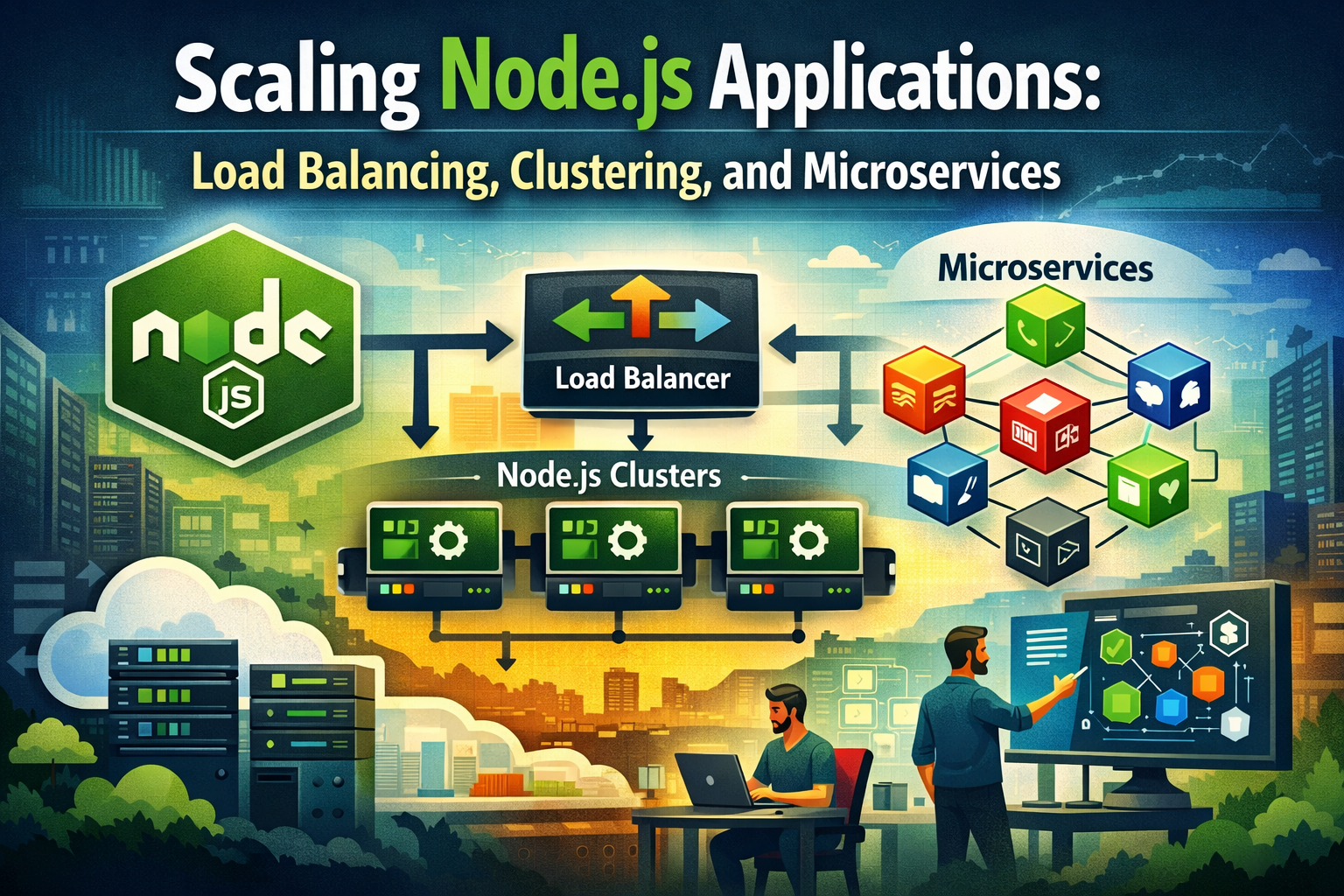
To handle this effectively, developers must implement strategies that distribute the workload efficiently across multiple processes or servers. In this guide, we’ll explore three key techniques for scaling Node.js applications:
- Load Balancing – Distributes incoming traffic across multiple servers to prevent overloading a single server and improve performance.
- Clustering – Utilizes multiple instances of the Node.js process on a single machine to take advantage of multi-core CPUs, improving concurrency.
- Microservices – Breaks down a monolithic application into smaller, independent services, making it easier to scale specific components based on demand.
By implementing these strategies, you can enhance performance, ensure reliability, and handle traffic spikes effectively, keeping your application fast and responsive as it grows.
Load Balancing: Distributing Traffic Effectively
What is Load Balancing?
When a Node.js application starts receiving high traffic, a single server may struggle to handle all incoming requests efficiently. Load balancing is a technique used to distribute incoming network traffic across multiple servers, ensuring no single resource is overwhelmed. This improves performance, reliability, and fault tolerance, making applications more scalable and resilient.
How to Implement Load Balancing in Node.js?
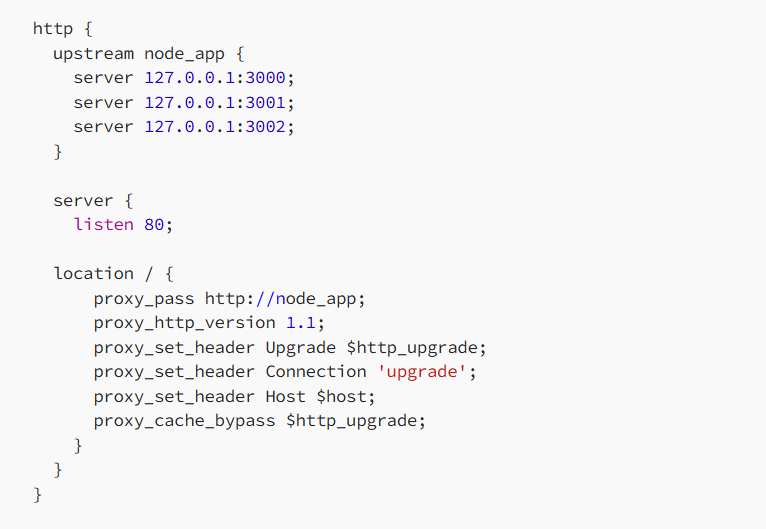
Using Nginx as a Reverse ProxyNginx is widely used as a reverse proxy and load balancer for Node.js applications. It helps distribute incoming traffic across multiple Node.js instances, ensuring better performance, stability, and fault tolerance. By acting as a middle layer between users and backend servers, Nginx efficiently manages request routing, load balancing, and even caching, making it a powerful tool for scaling applications.
Example Nginx Configuration for Load Balancing
 Using a Load Balancer (AWS ELB, HAProxy, etc.)
Cloud providers like AWS and Google Cloud offer managed load balancing solutions that automatically distribute traffic among instances.
Clustering: Utilizing multi-core CPUs
By default, Node.js runs on a single thread, meaning it can only use one CPU core at a time. This can become a bottleneck when handling a large number of requests, as it limits the application’s ability to fully utilize modern multi-core processors.
To overcome this limitation, clustering allows us to create multiple child processes, each running an instance of our Node.js application. These processes share the same server port and work together to handle incoming requests efficiently. By leveraging clustering, we can distribute the workload across multiple CPU cores, improving performance, scalability, and reliability.
This approach is particularly useful for high-traffic applications, as it prevents a single-threaded Node.js instance from becoming overwhelmed and ensures better resource utilization.
How Clustering Works in Node.js?
The built-in cluster module allows you to create multiple worker processes, each handling requests independently.
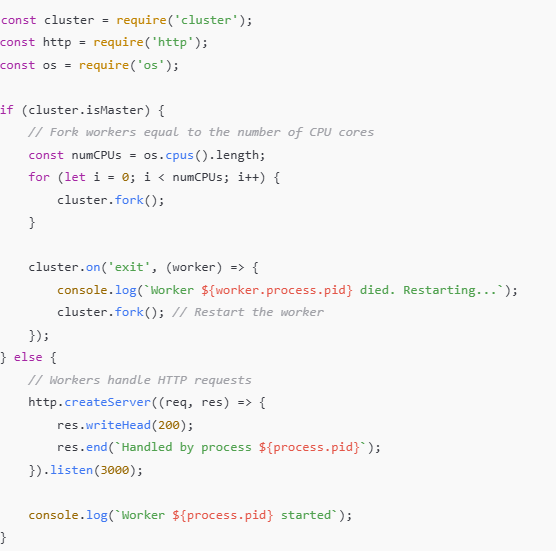
Here, the master process forks multiple worker processes, distributing incoming traffic among them.
Benefits of Clustering
- Maximizes CPU Utilization – Since Node.js runs on a single thread by default, it only uses one CPU core at a time. Clustering allows your application to spawn multiple worker processes, ensuring that all available CPU cores are utilized efficiently, leading to better overall performance.
- Enhances Performance Without Code Changes – One of the biggest advantages of clustering is that it boosts your application’s performance without requiring major changes to your existing codebase. By simply enabling clustering, your application can handle more concurrent requests, reducing latency and improving response times.
- Ensures Reliability with Automatic Restarts – If a worker process crashes due to an error, the clustering module can automatically detect the failure and restart a new worker process to replace it. This improves the application’s resilience, ensuring that users experience minimal disruptions even if individual processes fail.
By implementing clustering, you can significantly enhance the efficiency, scalability, and stability of your Node.js application while making full use of the system’s processing power.
Microservices: Scaling Horizontally
A microservices architecture is a modern approach to software development that breaks down a monolithic application into smaller, independent services, each handling a specific functionality. These services communicate with each other through APIs and work together to form a complete application.
By adopting microservices, businesses can achieve greater scalability, easier maintenance, and improved fault isolation. Since each service operates independently, developers can update, deploy, or scale individual components without affecting the entire system. This makes it easier to introduce new features, fix bugs, and optimize performance.
Additionally, microservices allow teams to work on different services simultaneously, using different programming languages and technologies suited for each task. This approach is widely used in large-scale applications where flexibility, efficiency, and reliability are essential.
Microservices Communication in Node.js
Microservices can communicate using:
In a microservices architecture, different services need to exchange data efficiently to work together as a unified system. Since each service runs independently, effective communication between them is crucial. In Node.js, microservices typically communicate using the following methods:
- REST APIs (HTTP Requests)
- Message Brokers (RabbitMQ, Kafka, etc.)
- GraphQL (For More Flexible Queries)
Example of a Simple Microservice System
To understand how microservices work, let’s consider a basic example involving two independent services:
- User Service – This service is responsible for handling user authentication and account management. It manages user sign-ups, logins, and authentication tokens, ensuring that only authorized users can access the system.
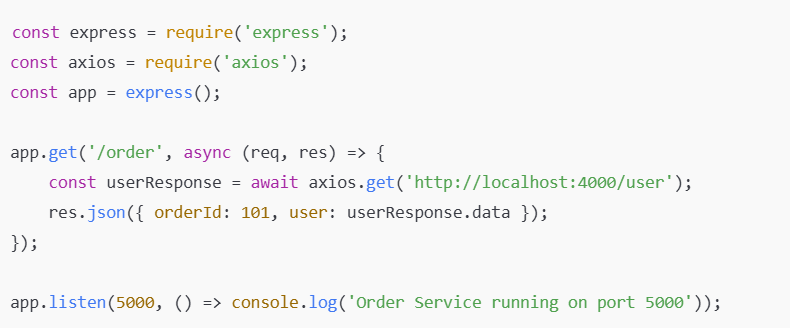
- Order Service – This service takes care of order management, including processing new orders, tracking order status, and managing payments. It operates independently but needs to verify user authentication before processing an order.
In a microservices architecture, these two services don’t rely on a shared database. Instead, they communicate via REST APIs or message queues. For example, when a user places an order, the Order Service can send a request to the User Service to verify the user’s identity before proceeding.
This separation allows each service to scale independently, making the system more flexible, resilient, and easier to maintain.
User Service (Express.js)
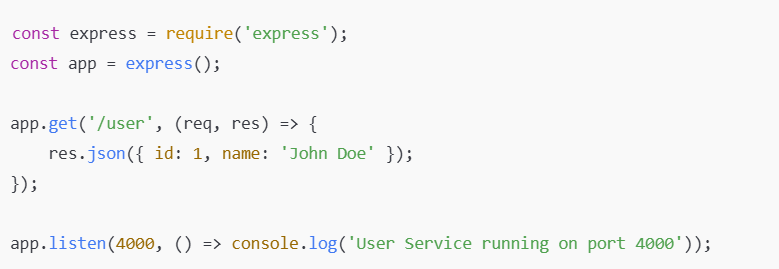
Order Service Fetching Data from User Service
Benefits of Microservices
- Scalability – One of the biggest advantages of microservices is that each service can be scaled independently based on demand. For example, if the Order Service experiences a high volume of traffic, it can be scaled up without affecting the User Service. This ensures better resource utilization and improves overall system performance.
- Flexibility – Since microservices operate as independent units, different teams can work on separate services without interfering with each other. This means that one team can develop the Payment Service, while another team focuses on the Product Catalog Service, using different programming languages or frameworks best suited for their tasks. This speeds up development and makes it easier to introduce new features.
- Resilience – In a monolithic application, a failure in one part of the system can bring down the entire application. With microservices, failures are isolated. If the Notification Service stops working, it won’t impact the Checkout Service, ensuring that the core functionality remains operational. This enhances the overall reliability and stability of the application.
By breaking down an application into smaller, loosely coupled services, microservices provide a more scalable, efficient, and fault-tolerant approach to building modern applications.
Which Scaling Approach Should You Use?
| Feature | Load Balancing | Clustering | Microservices |
|---|---|---|---|
| Best For | Handling high traffic | Multi-core CPU usage | Large applications |
| Implementation Complexity | Low | Medium | High |
| Performance Boost | High | Medium | High |
| Fault Isolation | Low | Medium | High |
For small-scale applications, clustering is sufficient. Medium-sized applications benefit from load balancing. Large-scale applications should consider microservices.
Conclusion
Successfully scaling a Node.js application requires choosing the right strategy based on your application’s needs and growth potential. Load balancing helps distribute traffic efficiently across multiple instances, preventing any single server from becoming a bottleneck. Clustering allows your application to take full advantage of multi-core processors, improving performance by running multiple processes in parallel. Microservices offer a flexible and scalable architecture, enabling independent scaling of different services while improving fault tolerance and maintainability.
By leveraging a combination of these techniques, you can build a highly scalable, resilient, and high-performance Node.js application that can handle increasing traffic and business demands efficiently.